
Is it time to replace SCCM? What to know before making the switch

For many IT teams, Microsoft SCCM (now MECM) has long been the backbone of endpoint management. But as environments shift to remote work, diverse devices, and leaner IT teams, many are reassessing whether it still delivers enough value. This raises a practical question: Is it time to replace SCCM? This article explores where SCCM still fits, where it creates friction, and what to consider before migrating to a new solution.
Replacing SCCM – At a Glance
- SCCM/MECM was designed for office-based environments. Today, the operational effort required to maintain SCCM environments is increasingly difficult to justify.
- The core problem: routine tasks demand specialist’s knowledge, and losing that person disrupts operations. Infrastructure overhead (distribution points, site servers) consumes time better spent on strategic work.
- Modern Unified Endpoint Management focuses on workflow-driven tasks, an intuitive interface, and easy-to-use automation.
- Although replacing SCCM requires significant effort, it offers an opportunity to simplify and improve endpoint management without sacrificing core capabilities.
Why SCCM creates friction for modern IT teams
The main issue with SCCM is not functionality but the effort required to perform routine tasks. Even common actions such as OS deployment, software distribution, or troubleshooting can involve multiple configuration layers, complex dependencies, and hard-to-interpret logs. As a result, even simple tasks often become time-consuming and error-prone.
This complexity creates a strong reliance on individual expertise. In many environments, critical knowledge resides with a single SCCM specialist, while documentation rarely reflects real-world configurations. Onboarding new staff or replacing key personnel involves a steep learning curve and can significantly disrupt day-to-day operations.
At the same time, SCCM introduces substantial infrastructure overhead. Distribution points, management points, and site servers require continuous maintenance, patching, and monitoring. Managing this infrastructure consumes valuable IT resources that could be better invested in strategic initiatives
What does simpler endpoint administration mean?
A well-designed Unified Endpoint Management (UEM) solution should enable a typical admin to deploy an OS image, distribute software, and verify patch compliance without relying on extensive documentation or specialized knowledge.
In practice, this means:
- Executing common tasks without navigating complex configuration layers
- Managing endpoints through a unified, intuitive interface
- Automating routine processes instead of coordinating them manually
The goal is not fewer features but significantly less operational friction.
Workflow-driven Endpoint Management: How modern UEM replaces SCCM
Modern UEM solutions—such as the baramundi Management Suite — are built around centralized, automated workflows rather than complex manual configurations. Administrators define what, where, and when, while the system handles execution.
Reusable, version-controlled tasks ensure consistent, repeatable processes and reduce the need for custom scripting. Automation reduces manual effort and minimizes the risk of configuration errors.
For OS deployment and software distribution, job-based execution enables standardized rollouts with high reliability. Features such as silent installations, flexible return-code handling, and real-time status reporting enhance transparency and operational control.
Pre-packaged and validated updates for third-party applications further streamline operations by reducing the time spent on packaging, testing, and deployment preparation.
“How do we know if our environment is too complex for a clean SCCM replacement?”
Will Fendt (Product Manager): “I would say no environment is too complex for a replacement. Complexity usually comes from accumulated customizations, undocumented workarounds, and processes that have grown over time. A migration is an opportunity to simplify and standardize workflows and reduce operational overhead. By replacing SCCM, you end up with endpoint management that's genuinely easier, a lot more transparent, and less dependent on any one person's expertise.”
Integrated vulnerability management beyond SCCM
Modern UEM platforms extend beyond endpoint management to support key stages of the vulnerability remediation process.
Automated vulnerability scanning identifies security gaps across endpoints, and risk-based prioritization helps IT teams focus on critical issues. Continuous tracking ensures full visibility into remediation progress and CVE status.
Together, automation, usability, and integrated security capabilities define the core requirements of a modern UEM solution. Vulnerability insights can be directly linked to remediation workflows, helping IT teams ensure that identified risks are addressed through future patch and software deployments.
Structured migration from SCCM to modern UEM
Migration typically begins with a comprehensive inventory of existing IT assets, followed by translating current workflows into the new environment. Implementation is staged to ensure that software deployment, workflow integration, and functional validation are completed before the final cutover.
Once in place, task automation and automated remediation capabilities available in modern UEM solutions reduce the manual workload that defined day-to-day operations with SCCM
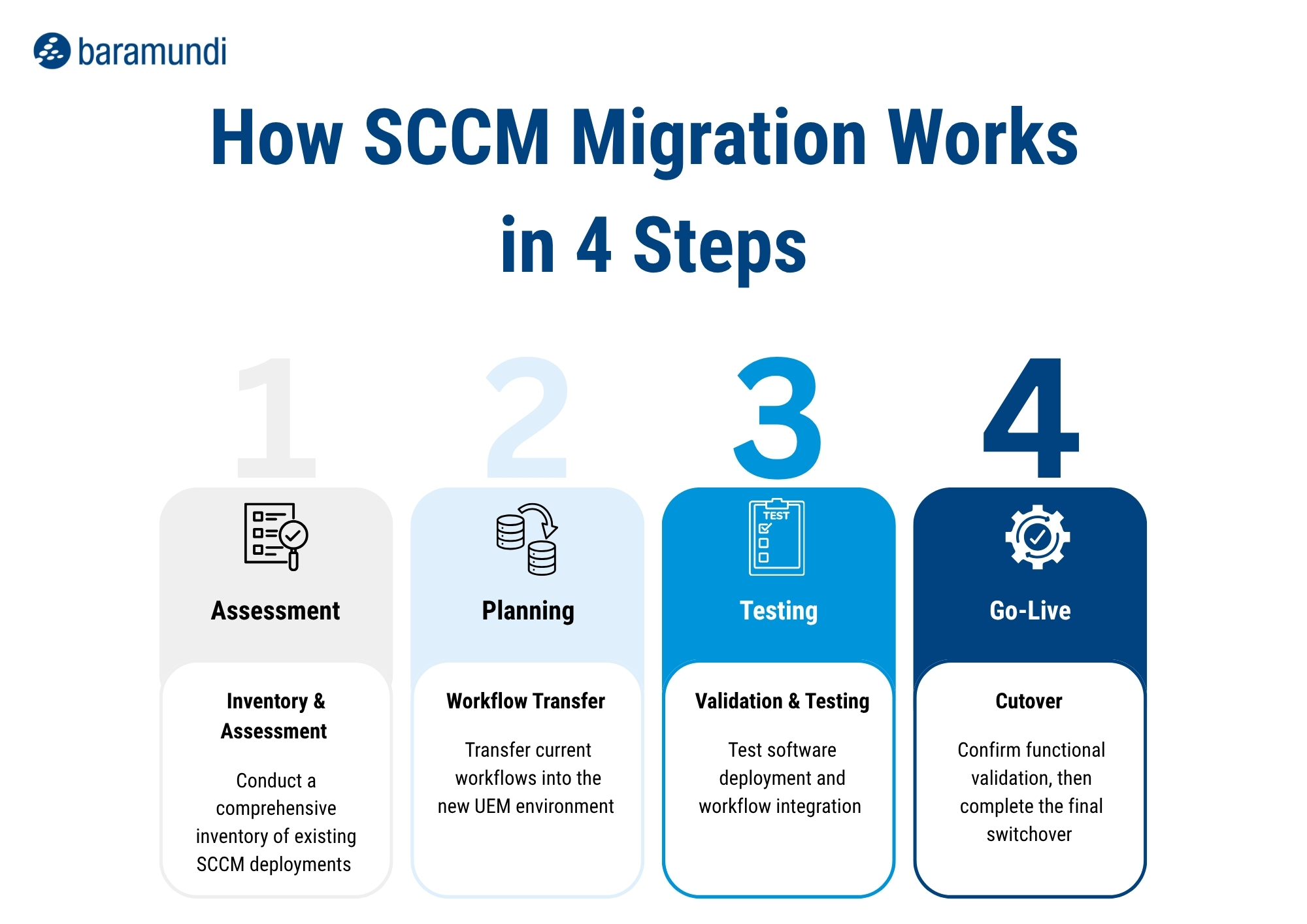
Co-Management with Intune: When a phased approach is best
A complete migration isn’t always the right move or immediately feasible. In many environments, the more sensible option is co-management using the existing infrastructure and modernizing it in stages.
The white paper “Intune Co-Management – Hybrid management with baramundi” highlights the scenarios that call for a hybrid approach and explains exactly how the integration works.
How long does an SCCM replacement take?
Many organizations can migrate core tasks, such as OS deployment and standard software distribution, within a few weeks.
More complex environments, specialized patch management policies, or custom application packages may require additional time. In most cases, full migration can be completed within approximately 90 days.
What changes after you replace SCCM?
Moving away from SCCM’s complexity highlights the advantages of modern endpoint management:
- Automatically updated inventories improve data accuracy
- OS updates and patch deployments accelerate from days or weeks to hours
- Automation reduces administrative overhead and frees resources for strategic work
Conclusion: SCCM replacement as a foundation for future IT
Replacing SCCM with a modern UEM solution—such as the baramundi Management Suite—provides organizations with a scalable platform that meets today’s IT and security requirements.
In addition to efficient endpoint management, it supports advanced vulnerability and risk management, greater automation, and long-term operational efficiency.