
Smart Intune Co-Management
Hybrid Device Management with baramundi and Intune
Intune Co-Management – Hybrid management with baramundi
IT Management with a Best-of-Breed Approach
Everyone has their own unique strengths—this applies not only to people, but also to software. This is exactly where Intune Co-Management comes in: combining Microsoft Intune’s modern management approach with baramundi’s proven Unified Endpoint Management gives IT teams a powerful set of advantages.
When properly integrated, this Microsoft Intune integration unlocks measurable efficiency gains in endpoint management and creates the ideal foundation for a hybrid IT strategy.
Better Together – Unlock the Full Potential of Intune Co-Management
SEAMLESSLY COMBINE BARAMUNDI UEM & MICROSOFT INTUNE
- More Flexibility: Two independent management systems give you the freedom to make changes and run tests — without disrupting your overall operations.
- Business Continuity: Combining cloud-based management with on-prem systems boosts security and keeps things running smoothly, even during disruptions.
- Manage Any Environment: A hybrid setup with baramundi and Intune lets you support a broader range of devices across diverse platforms.
- Data Sovereignty: Keep control of your data by storing it on-prem, while still benefiting from the convenience of cloud-based management.
Our approach is deliberately balanced: Microsoft services where they provide the greatest business value, and baramundi where we require maximum operational control, resilience in emergency situations, and independence. This allows us to reduce risk without limiting ourselves technologically.

Philippe Bähler, IT Director
Division of Responsibilities in an Ongoing Intune Co-Management Environment
Co-management does not mean duplicate administration; it is a deliberate distribution of workloads. The key is determining which platform can handle each task more efficiently and reliably.
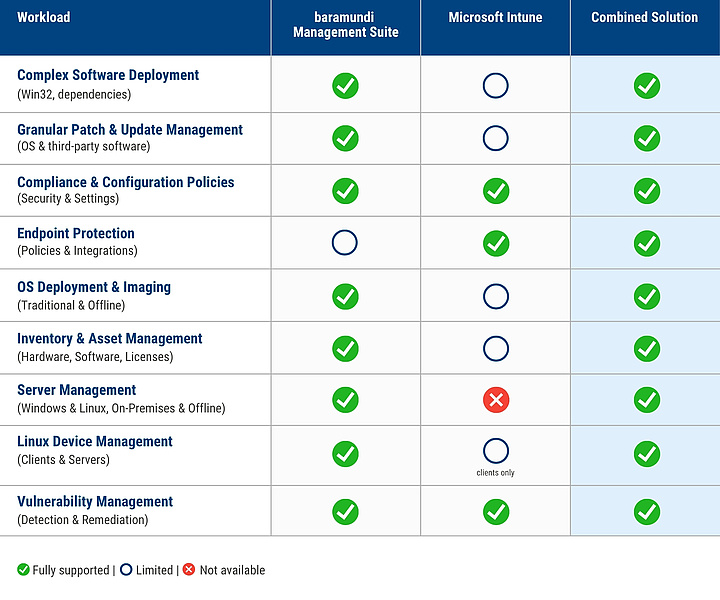
Why Intune Co-Management with baramundi Stands Out
The baramundi Management Suite complements your Microsoft Intune investment instead of replacing it. This allows you to benefit from both deep on-premises control and modern cloud governance:
- A centralized view instead of switching between consoles
- Powerful patch and update management
- Comprehensive compliance monitoring
- Preserve the power of on-premises management
- Unified asset inventory
- Simplified configuration management
Explore More Resources on Intune Co-Management
White Paper, Checklist & Blog

White Paper
Discover how to optimally combine baramundi and Microsoft Intune. In this free whitepaper, learn how IT teams can stay proactive, streamline processes, and maintain full control over all endpoints through co-management.

Checklist
In our checklist, you’ll get a concise, one-page overview of the key arguments to successfully implement baramundi UEM & Intune Co-Management in your organization.

Blog
Using Microsoft Intune but still facing endpoint management gaps? baramundi Management Suite seamlessly complements Intune — from legacy updates to managing all your devices efficiently.
FAQ: Intune Co-Management with baramundi
What is Intune Co-Management?
Why should my company invest in more than one solution?
Is running both systems in parallel complicated?
What do I need for Intune Co-Management with baramundi?
How does the baramundi Management Suite support Intune Co-Management?
Can I Enable Co-Management for Existing Devices?
Do I Need a Separate Intune License?
Which Windows Versions Are Supported?
What Happens If a Device Has No Internet Connection?
What’s the Best Way to Get Started?
Which Add-Ons fit your company?
We’re happy to help you find the perfect solution for your company.
Exactly what you need –
no more and no less!