Auto Remediation: Identifying and Resolving IT Issues Efficiently

A dashboard doesn’t protect you. Action does. Automated remediation is increasingly important because IT teams must not only identify and assess anomalies more quickly but also resolve them efficiently. Only when a diagnosis leads to targeted and — where appropriate — automated action can effective endpoint improvements be made, minimizing frustration and unnecessary costs.
Auto Remediation – At a Glance
- Visibility alone isn’t enough: Only through targeted and appropriate automated measures does a diagnosis translate into effective improvements at the endpoint.
- Automated remediation translates insights from DEX and monitoring into concrete, scalable actions, such as updates, uninstallations, or configuration changes.
- A structured process of detection, prioritization, implementation, and monitoring ensures long-term stability and provides a stronger basis for decision-making.
- Proactive measures enable IT teams to focus on strategic work, improve end user productivity, and help companies reduce risks and operational costs.
Remediation: When IT Doesn’t Just Diagnose, But Heals
Good doctors do more than recognize symptoms. They listen, order tests, identify patterns, and ultimately render a diagnosis: “This is the disease, this is the cause, and
this is how we’ll treat it.”
A similar process in IT has long been far more difficult. An employee reports: “My laptop battery barely lasts half a day.” IT investigates and conducts a time-consuming
analysis using various tools to test the device, applications, and operating system, and sometimes speaks directly with the user.
This is precisely where insights from Digital Employee Experience (DEX) solutions are having a major impact. With
modern DEX approaches, issues that once surfaced only as support tickets or gut feelings are now visible at an early stage. The real question is how to turn these insights
into actions that remediate problems, ideally through automation.
From Analysis to Automated Remediation
In medicine, patients rarely receive a diagnosis without specific next steps or treatments. In IT, however, this happens surprisingly often. Dashboards show anomalies. Reports highlight risks. Tickets describe symptoms. But in the end, it’s up to the administrator to decide what to do next and how to do it. This is exactly where automated remediation comes in.
What is remediation?
Remediation is the process of resolving identified problems or vulnerabilities in an IT environment through specific measures. It focuses on identifying risks and steps to eliminate or mitigate them. Automated remediation enhances this approach by automatically implementing targeted measures, such as updating or uninstalling software or making configuration changes.
When an application becomes a remediation case
An example of automated remediation: A particular application is installed on many endpoints but is rarely used. At the same time, this software is outdated and regularly
causes issues, including increased CPU load, longer boot times, and security risks due to missing updates.
The primary task of IT is not only to detect issues but also to initiate appropriate remediation using automation wherever possible. The goal is to identify the problematic
application, automatically update it on endpoints where it’s used more frequently, or automatically uninstall it on computers where it is never used. On endpoints where the software
interferes with other applications (e.g., due to incompatibilities with a specific version), a suitable version or alternative application can be installed. These measures can often
be partially or fully automated.
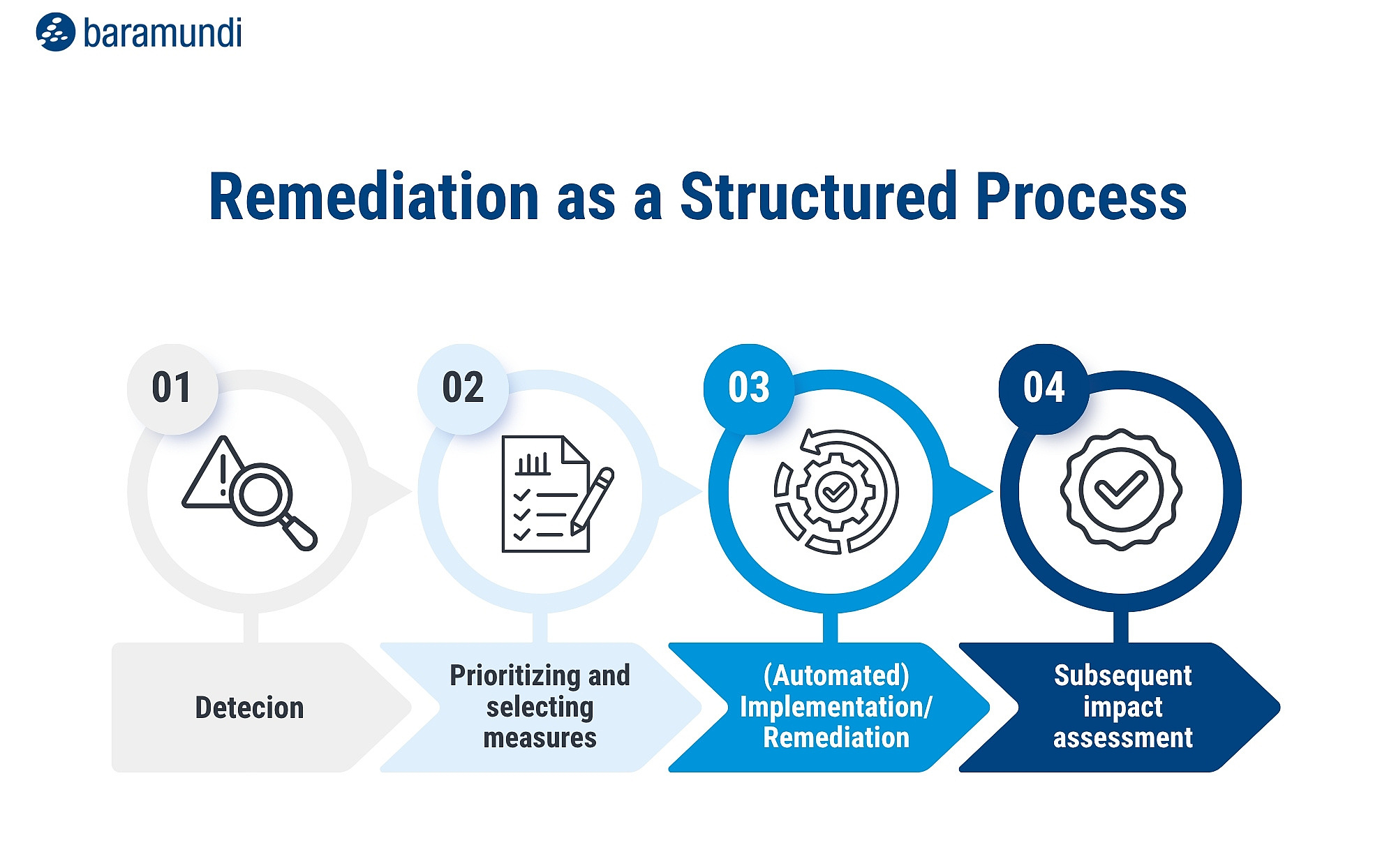
Remediation as a Structured Process
A solution such as the baramundi Proactive Hub can support these decisions and translate them into concrete actions: for example, creating a group of affected devices, performing an uninstallation, accounting for necessary exceptions, and then verifying whether performance, stability, or risks have improved. Ideally, IT teams can perform before-and-after comparisons of experience data to determine whether the problem was resolved, or whether new anomalies have emerged. In this way, observations lead to targeted improvements. It creates a structured remediation process consisting of:
When Endpoint Data Becomes Remediation
Identifying anomalies is only the first step. Only when IT teams take targeted and—as much as possible—automated action based on these findings does DEX and monitoring turn into true
remediation. Our white paper, “Endpoint Data Without Data Silos,” shows how telemetry and DEX metrics can be leveraged across systems to classify issues more quickly and implement measures
efficiently.
Learn how to use APIs, ITSM integration, and automation to lay the foundation for intelligent remediation processes.
Download the white paper “Endpoint Data Without Data Silos” now
How Automated Remediation Reduces Effort
Effective remediation does not mean that a platform makes random changes to the endpoint, nor does it mean repeatedly initiating standard measures manually. This is where the
strength of intelligent remediation tools lies: They don’t automate just for the sake of automation, but rather when it makes technical sense and reduces IT workloads.
Automated remediation is a valuable component, especially for recurring cases, because it enables measures to be rolled out in a controlled, consistent manner.
It also handles tasks that are important yet often go undone in day-to-day operations as admins drive projects forward, address security requirements, or implement new business
processes.
But it’s not just about technical simplification. It’s about providing measurable relief for:
- IT teams: With less manual research, fewer recurring tickets, less guesswork, and less frustration on both sides. Admins can determine which actions to take based on warning signs.
- End users: Through earlier problem detection, targeted troubleshooting, and faster resolution, ideally before users open a ticket.
- Companies: Improved system reliability, productivity, and user satisfaction thanks to a proactive IT department.
Conclusion: Auto Remediation as the Next Step in Proactive Endpoint Management
A correct diagnosis--in medicine and in IT--is important. But it’s only effective if it leads to the correct treatment and a positive outcome. DEX reveals what’s ailing digital work environments by providing crucial signals from actual user experiences. Today, the development of the baramundi Proactive Hub is focused on turning analysis into action by combining diagnosis, recommended next steps, and automation to create a structured remediation process. It can help IT teams not only identify problems but also fix them quickly, efficiently, and automatically.